
How to Get Started with AI and Pitfalls to Watch Out For
Does generative AI seem cool but unreliable?
AI tools — like Microsoft Copilot or ChatGPT — can help with everything from writing an email to creating complex Excel functions.
But it’s far from perfect, as it also can hallucinate and have a hard time admitting its answers are wrong.
If your organization is adopting AI or you just want to see if it can help you be more productive at work, we’re here to help.
Let’s examine how to get started with AI while noting the pitfalls to watch out for as you get acclimated.
New to AI? Start Small
Whether you’re completely new or you’ve dabbled in ChatGPT or Gemini, our advice is to start small.
Luckily, if you have a Microsoft 365 Business license, you get a free version included, called Microsoft 365 Copilot Chat.
It won’t be grounded in the data from you Emails or OneDrive and SharePoint like the paid version of Microsoft 365 Copilot Business, but you can use it to help you draft an email to a client or build a quick meeting agenda.
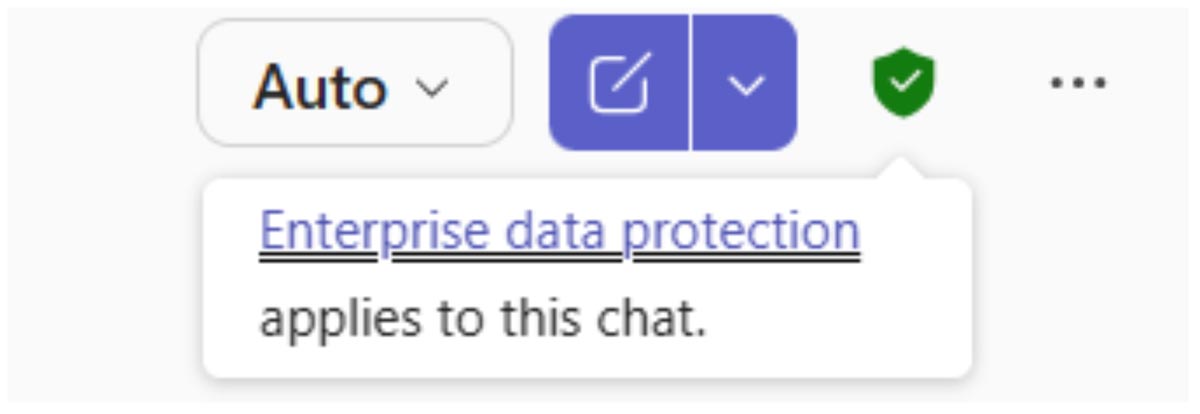
Even the free version of Copilot offers enterprise data protection, so you know your data is secure, private and follows the same admin settings as Microsoft 365. Additionally, Microsoft doesn’t use prompt data to train its model.
It’s important to note enterprise data protection is only available when logged in with a work account. To ensure your chats are protected, look for the green shield in Copilot Chat.
To get you started, here’s a good primer on 15 smart ways to use AI. You might not get the results you want the first time you start using Copilot, and that’s OK. There’s a learning curve with AI.
But once you’ve figured out how to master prompting, you’ll wonder how you worked without it.
Not sure where to find Copilot? You can access it in multiple places, including Teams, Outlook and your browser.
Pitfalls to Watch Out For
AI is wrong sometimes. But so is your GPS, autocorrect or the weather report and that doesn’t keep them from being valuable tools. The great thing about AI is you can have a conversation with it to tweak your prompt and get the correct response.
Here are some things to consider as you begin using AI.
Always Check Your Work
If you use AI enough, you will get wrong answers or entirely made-up answers. But that doesn’t mean it’s not useful.
Take anything it says with a grain of salt. If a claim seems too good to be true, double-check it. Even if it cites sources, make sure those are legitimate sources, and the claim isn’t misleading to fit a bias.
Every AI model has biases because it’s trained on human data. It’s important to recognize that.
AI can save your team hundreds of hours per week in busywork, but it isn’t an all-knowing replacement for good old-fashioned research.
AI Can Be Obvious to Spot
While AI is pretty good at mimicking any voice or tone, it still has some obvious tells that anyone who has encountered AI-written content can spot.
For example:
- Overreliance on em dashes (—)
- The phrase: “It’s not [x], it’s [y].”
- Frequent emoji use, even in a professional setting
If you use AI to write anything for you, you should go through and make some edits to match your own voice and tone rather than copying and pasting whatever it spits out.
Better Isn’t Always Best
Just because writing sounds better doesn’t necessarily mean it’ll have the same feeling.
If an employee asks you for a letter of recommendation, and you ask Copilot to write it, it’ll sound great, but it’ll also be obvious it was AI-generated.
It will lack a personal voice that letters of recommendation need to be persuasive. Additionally, how is your employee going to feel if you couldn’t take 20 minutes to write a letter?
No matter how poor your writing skills are, some writing is just better done by humans.
Recognize Your Bias
AI struggles with its own biases, as well as catering to yours.
For example, if you ask leading questions, AI will give you the answer you’re looking for. A question of “I should ask for a raise, right?” is going to get a different response than “What are the pros and cons to asking for a raise?”
The first question is solely focused on leading the AI to believe you deserve a raise, whereas the second considers the positives and negatives.
Can Generative AI Help Your Organization?
AI can save your team hundreds of hours per week in busywork, but it isn’t an all-knowing replacement for good old-fashioned research.
Contact us to schedule a consultation, and we’ll discuss how AI can help your employees be more productive while avoiding the pitfalls of misinformation.
Stay updated! Get tips and insights delivered to your inbox weekly by subscribing to our newsletter.