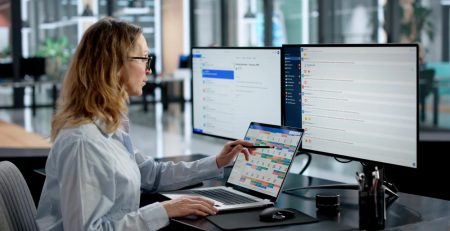

Home Office Setup for Remote Work: What You Actually Need
A laptop is designed to let you work almost anywhere. That does not mean almost anywhere is a good place to work all day. A good home office setup for remote work should make a full workday easier, not simply give you somewhere to open your laptop.
Many people who regularly work from home are still using the same kind of setup they would use for an hour at an airport: sitting on the couch, working from the kitchen table or spending the day looking down at a small laptop screen.
The setup works, but it makes everything slightly harder. You have less room to see your work, spend more time switching between windows and end up working around the computer instead of setting it up around you.
A laptop screen is a small window into your work. That may be fine for answering email or finishing one task. It becomes limiting when you spend a full day moving between email, documents, meetings, spreadsheets and business software.
This advice is not for someone who occasionally works from home. It is for someone who spends full workdays there regularly and is still using a temporary setup.
Give Yourself More Room to Work
The basic upgrade is simple: add a monitor, keyboard and mouse.
A monitor gives you more room to work. You can keep more information visible instead of constantly switching between windows and applications.
Extra screen space is especially helpful when your work involves comparing information or using several applications throughout the day. If you have room for two external monitors, even better.
The keyboard and mouse let you position your screens more comfortably instead of spending the day leaning over your laptop.
Basic wired equipment works fine, but wireless versions are a nice upgrade.
Before buying monitors, ask whether your employer has any available.
If you continue using the laptop screen beside the monitor, a basic stand can raise it closer to the same height.
There is no single computer configuration that works for every employee. If your organization is deciding how to equip remote, hybrid and in-office employees, we have also compared different workplace setup options, including laptops, desktops and all-in-one computers.
For regular full-day remote work, start with an external monitor, keyboard, mouse and docking station. A headset can make virtual meetings easier, while a wired Ethernet connection may help if Wi-Fi causes calls or remote applications to disconnect.
Make It Easy to Connect
A dock connects the monitors, keyboard, mouse, power and other accessories to the laptop.
Without one, you may need to connect several cables each time you sit down. With one, the entire setup can usually connect through a single cable.
A dock made by the laptop manufacturer is often the simplest compatibility choice, but it may also be the most expensive. A compatible third-party USB-C dock can be a reasonable alternative.
Check with your IT team before buying one. Also confirm that the dock has the right connections for your monitors and that you have the correct cables for both ends.
Improve Calls and Connectivity Where Needed
If you spend a lot of time in virtual meetings, a headset can be another worthwhile addition, especially in a shared or noisy home. It can make it easier for you to hear and help others hear you more clearly.
Wi-Fi may be completely adequate, but if calls freeze or remote applications regularly disconnect, a wired Ethernet connection may be more reliable.
A reliable connection is only one part of supporting employees outside the office. Organizations also need to think about how employees securely access company data and applications. We have covered how organizations can address work-from-home security concerns without giving up the flexibility of remote work.
Build for a Full Workday
You do not need an elaborate office or expensive equipment.
You need enough screen space to see your work, a setup that lets you sit comfortably and equipment that is easy to connect each day.
A laptop is built to make work portable. A home office should make a full workday easier.
What Do You Need for a Good Home Office Setup?
For regular full-day remote work, start with an external monitor, keyboard, mouse and docking station. A headset can make virtual meetings easier, while a wired Ethernet connection may help if Wi-Fi causes calls or remote applications to disconnect.
Home Office Setup for Remote Work Checklist
For people who regularly work full days from home:
- Get a monitor, or even two if you can, so you are not working through a laptop-sized window all day
- Get a keyboard and mouse so you can position yourself comfortably
- Get a dock so everything connects with one cable
- Use a headset if background noise is a concern
- Consider wired Ethernet if calls freeze or apps keep disconnecting
Stay updated! Get tips and insights delivered to your inbox weekly by subscribing to our newsletter.
Want to know more about Remote Work Technology?
A good home office setup is only part of the equation. We help businesses support remote and hybrid employees with reliable technology, secure access, Microsoft 365, connectivity and day-to-day IT support.