
What is a ClickFix Scam and How Do You Protect Yourself?
You know those simple tests some websites make you interact with to prove you’re not a robot?
They are CAPTCHA (Completely Automated Public Turing test to tell Computers and Humans Apart) boxes, and bad actors are misusing them to trick people into running malicious programs that can steal sensitive information.
It’s called a ClickFix scam.
That doesn’t mean you should immediately close the window any time you see a CAPTCHA box, but it is important to know what to look for and how these attacks work.
Let’s dive in so you know how to protect yourself and your organization.
How Do ClickFix Scams Work?
ClickFix scams generally begin with a phishing email. It could be a bad actor pretending to be your IT team, asking you to install the latest security update, or an attacker posing as Microsoft, telling you that you were signed out of your account.
A link in the email redirects the victim to a malicious website that requests human verification.
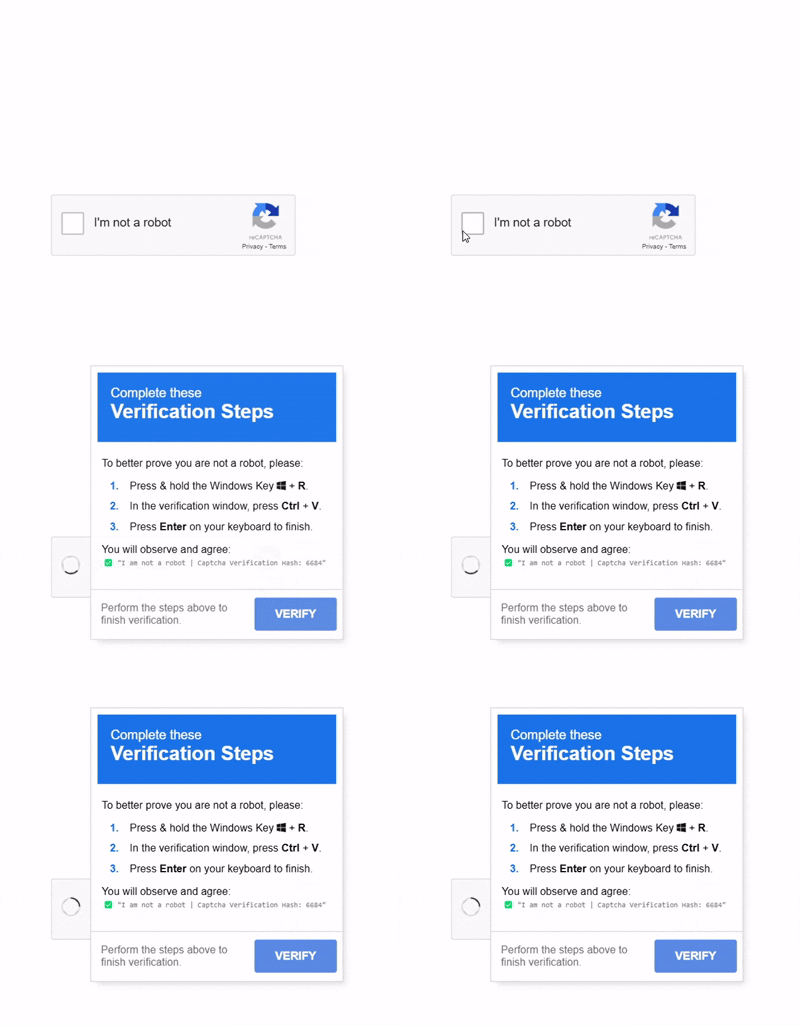
1. After clicking the box that says, “I’m not a robot,” a new window appears telling the victim to press the Windows Key + R, which opens the “Run” dialog box.
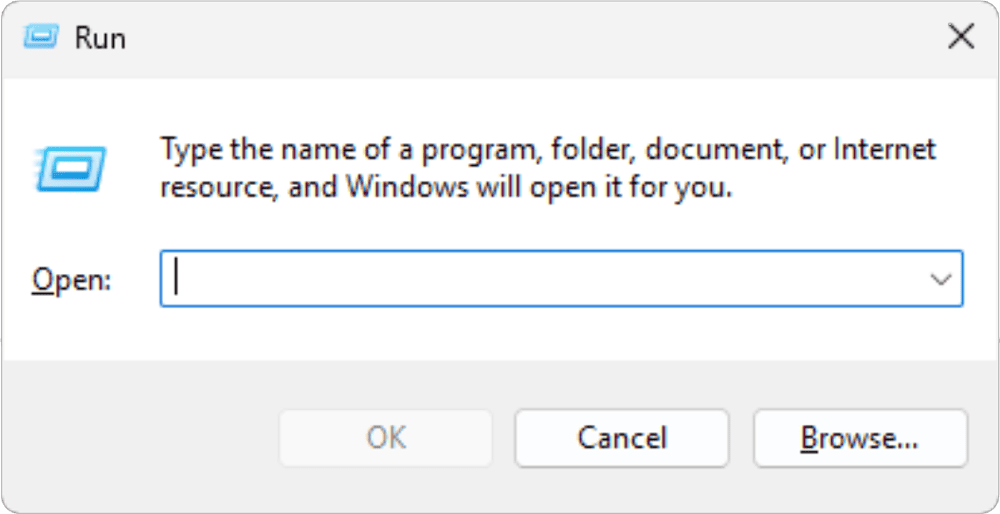
2. The victim is then told to paste the command using the shortcut CTRL + V (paste) and press “Enter” to run the command.
3. The command runs malware that can steal sensitive data or install ransomware, encrypting data until a ransom fee is paid.
The work done in the background is what makes these kinds of attacks so dangerous. The malicious website you visited automatically copied a command to your clipboard without you realizing it. Then, you’re asked to run a command, thinking you’re only completing the verification process when you are actually running a malicious program.
So, how do you protect yourself from these kinds of attacks?
How to Protect Yourself from ClickFix Scams
There are a few things you can do to avoid becoming a victim:
- Disable Run command shortcut: Ask your IT team or MSP to disable the shortcut to open the “Run” dialog box (Windows Key + R). It’s not a perfect solution, as it could break other Windows features, but it will stop people from unknowingly hurting themselves.
- Be wary of instructions a website gives you: If a website instructs you to open the “Run” dialog box by pressing Windows Key + R, DO NOT DO IT. IT professionals mostly use the “Run” dialog box to run scripts and other programs. A legitimate CAPTCHA will not ask you to open “Run.”
- Verify the URL: Check the browser’s address bar to ensure you are on a legitimate website before attempting verification.
- Avoid downloads: Legitimate “I’m not a robot” tests do not require downloading files or pasting commands.
- Report the scam: If you see this attack, there’s a good chance your co-workers may see it. Tell your IT team or managed service provider so they can protect other employees.
Stop ClickFix Scams Before They Wreak Havoc
All it takes is one malicious ClickFix scam to give attackers unlimited access to your organization.
Contact us to schedule a consultation to discuss how we can help secure your sensitive data by training your employees to spot CAPTCHA attacks and other scams.
Stay updated! Get tips and insights delivered to your inbox weekly by subscribing to our newsletter.