
What to Do When You Get an Email from Yourself
Getting an email from your own address is unsettling. Your first thought is probably: Is my account compromised?
Not likely, but it’s something you should definitely report to your IT team/managed service provider.
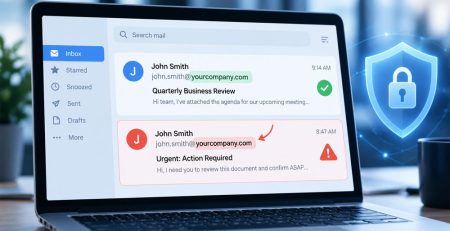
These attacks are called “From: spoofing” emails, and bad actors are using your email address to bypass spam filters.
Let’s examine why these attacks happen, how they work and what can be done to stop them.
What are Spoofing Emails?
Spoofing emails are a form of phishing that disguises the sender’s address to make it appear trustworthy. They are designed to trick you into giving up account credentials or sensitive information. Additionally, they can install malware on your computer, bringing operations to a halt.
But if you see your email address in the “From:” field, you shouldn’t panic.
The attacker is using your email address to get your attention. They do not have access to your email account.
This attack typically exploits Microsoft’s Direct Send feature, a legacy option that allows devices such as printers and scanners to send emails within your organization without requiring a login.
Because no login is required, attackers can abuse it to harm your organization. It was a useful feature, but now it’s just another unlocked door.
Spoofing Emails:Illogical But Effective
While it seems counterintuitive, attackers rely on the disguise specifically because it creates immediate confusion and panic.
We have seen an uptick in spoofing emails, so it’s important to notify your team what these kinds of attacks look like.
Here is why that suspicious feeling actually works in their favor:
- The “Proof of Hack” Illusion: In many extortion scams, the attacker’s goal is to convince you they have control over your digital life. If you see an email from your own address, your first thought is often “Oh no, they’re inside my account right now,” rather than “This is a clever technical trick.”
- Panic Overpowers Logic: When you see your own name in the “From:” field, it creates an immediate sense of shock or panic. Attackers use this to push you into a “fight or flight” mode where you might click a link or pay a ransom before you have time to think critically.
- Exploiting Trust in Systems: Many users have a mental shortcut that says, “If it’s in my inbox and it’s from me, it must be safe.” This familiarity can cause even tech-savvy people to drop their guard momentarily.
- Bypassing Modern Filters: Email services often have strict filters for external senders but may be more lenient with internal mail. Spoofing your own address is a technical attempt to slip through those defenses and land directly in your primary inbox.
How to Respond to Spoofing Emails
As an end user, there isn’t anything you can do to stop spoofing emails. That’s why attackers use these attacks in the first place.
However, your IT team or MSP can enable the Reject Direct Send feature within Microsoft 365 to prohibit anyone from using your email address to send emails.
With that being said, you can play an important role in spotting and reporting spoofing emails:
- Stay calm: Emails from yourself that you didn’t initiate look like a compromised account, but it’s a deceptive trick to cloud your judgment. Take a deep breath.
- Don’t interact with the email: Don’t open any attachments, click any links or follow any instructions. If they say they have access to your account, they are lying.
- Let your IT team/MSP know: Don’t forward the email to them, but rather, take a screenshot and send it to them. If you have one, use the Phish Alert Button so your MSP can remove that email from your co-workers’ inboxes. If they are targeting you, there’s a good chance they are targeting others within your organization.
Stay Alert, Stay Secure from Spoofing Emails
We have seen an uptick in spoofing emails, so it’s important to notify your team what these kinds of attacks look like.
Not sure if your current processes would catch this attack? Contact us to request a security assessment, during which we’ll identify gaps in your company’s protection.
Stay updated! Get tips and insights delivered to your inbox weekly by subscribing to our newsletter.