What is Enterprise Data Protection in Copilot and How Does it Keep You Safe?
If you’ve used Copilot at all since it launched three years ago, you’ve probably seen the term “enterprise data protection.”
It sounds technical, but really, it’s just Microsoft’s way of saying, “If you trust us with your email, you can trust us with Copilot prompts.”
Every AI tool (ChatGPT, Gemini, etc.) uses your data differently, even across its free and paid versions.
And now that any user with a Microsoft Business license can use Copilot Chat, we’ve been getting questions about how it handles sensitive data.
So, let’s talk about enterprise data protection and how it keeps your organization safe.
What Does Enterprise Data Protection Mean?
Microsoft’s enterprise data protection is built on five pillars:
- Your data is secure: Microsoft encrypts your data to protect against unauthorized access.
- Your data is private: Microsoft doesn’t have access to the data, protecting against exposure to third parties or competitors.
- Your access controls and policies apply to Copilot: Copilot follows your permissions, retention policies and other administrative settings. If you don’t have access to a file, Copilot can’t access it for you.
- You’re protected against AI security and copyright risks: Copilot protects against prompt injections and will not respond with harmful content, reducing risks found in public AI tools.
- Your data isn’t used to train the model: Prompts and data are only used to create relevant responses.
If you trust Microsoft to protect your emails, chats and other work data, you can trust it to protect your prompt data, as it falls under the same security principles.
Copilot Chat is only grounded in public web data and doesn’t have access to your SharePoint files, Teams chats or emails (you need a Microsoft 365 Copilot license for that feature). However, you can upload a file or paste organizational data directly into the prompt, but enterprise data protection still applies.
This is different from the free versions of ChatGPT or Gemini, which use your prompts to train their models and don’t encrypt your data.
Look for the Green Shield
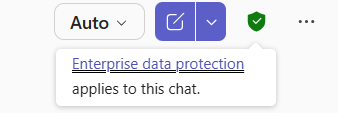
To ensure your chat prompts are protected, look for the green shield in Copilot Chat.
When you use the Copilot app or visit the Copilot site, you will see this green shield next to the “New chat” button. Hovering over this green shield confirms enterprise data protection is enabled for the chat.
Even with enterprise data protection, you should still avoid using personally identifiable information in prompts, such as medical records, Social Security numbers and addresses.
However, it is safe to share your organization’s proprietary information.
The takeaway? If you trust Microsoft to protect your emails, chats and other work data, you can trust it to protect your prompt data, as it falls under the same security principles.
Increase Productivity and Efficiency with Copilot
Have you tried Copilot Chat and want to dive into a full Copilot license?
If your organization wants to learn more about safe Copilot usage, contact us to schedule a consultation. We’ll show you how it can streamline your workflow and increase productivity while keeping your data secure.
Stay updated! Get tips and insights delivered to your inbox weekly by subscribing to our newsletter.