How Hackers Trick You with Fake MFA Resets
Any security-minded organization knows multifactor authentication is a must. Research shows using MFA can block more than 99.2% of account compromise attacks.
The scary part?
Attackers know this and can use text-based phishing messages to trick victims into thinking their accounts are in danger of being compromised.
In fact, more than 1 billion unwanted SMS messages per minute are sent globally and at least 1 million of those are intentionally malicious.
And it gets worse.
Organizations don’t send these kinds of messages unless you initiate the reset, so slow down and think about what is being asked of you before you hastily act.
These fake MFA resets or warning messages often are not that different from real notifications that Google, Microsoft or other companies send when you reset your password or change your MFA method.
So, what do these fake messages look like and how do you tell if it’s real? Let’s dive in and talk about fake MFA reset messages.
What Does a Fake MFA Reset Look Like?
While the fake messages are carefully designed to mimic the real ones, there are a few red flags to watch out for if you do receive a text message about your MFA.
Those red flags include:
- You did not initiate the account reset
- The message comes from an unknown or unrecognized phone number
- The message asks you to call a different number than where the message was sent from (real requests often come from “short numbers” that are four or five digits instead of a 10-digit phone number)
- Sense of urgency (do this now or your account will be compromised)
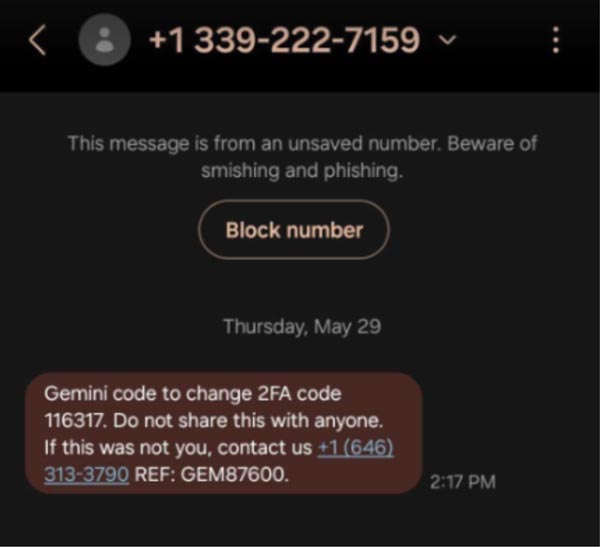
This example above hits all the bullet points, and it even offers a reference number to appear even more legitimate.
The number in the text, of course, will connect you with the attacker who will pretend to be customer service and “help” you regain access to your account.
Other messages might have a URL that will take you to a login page so you can regain access to your account.
Never click these URLs.
You’ll most likely get redirected to a fake page designed to steal your login information, or the link itself could install malware that could steal your data or lock your device.
Steps to Protect Your Organization
But it’s not all doom and gloom.
Here are some important things to remember if you receive an MFA reset warning message:
- Be wary of unexpected messages: Organizations don’t send these kinds of messages unless you initiate the reset, so slow down and think about what is being asked of you before you hastily act. MFA reset warnings are not to be confused with MFA prompt bombing, which is initiated by an attacker hoping to gain access to your account.
- Don’t call numbers or click URLs: If you’re unsure if the message is real, visit the organization’s website and find the real contact information.
- Report the number as spam: Most phones have an easy way to report messages as spam. It’ll also block the number, so you don’t receive similar messages in the future.
Learn to Spot Fake MFA Reset and Other Scams
One careless click could bring your business operations to a halt. Don’t wait until you’ve already been attacked!
Contact us to schedule a consultation to see how we can help secure your sensitive data by training your employees on how to spot fake MFA resets and other scams.
Stay updated! Get tips and insights delivered to your inbox weekly by subscribing to our newsletter.