What is Device Code Phishing and How to Defend Against It
You’re most likely familiar with device codes even if you’ve never heard the term before.
If you’ve logged into a streaming service — like Netflix, HBO Max or Apple TV+ — for the first time by entering a code displayed on your TV, then you’ve experienced device codes.
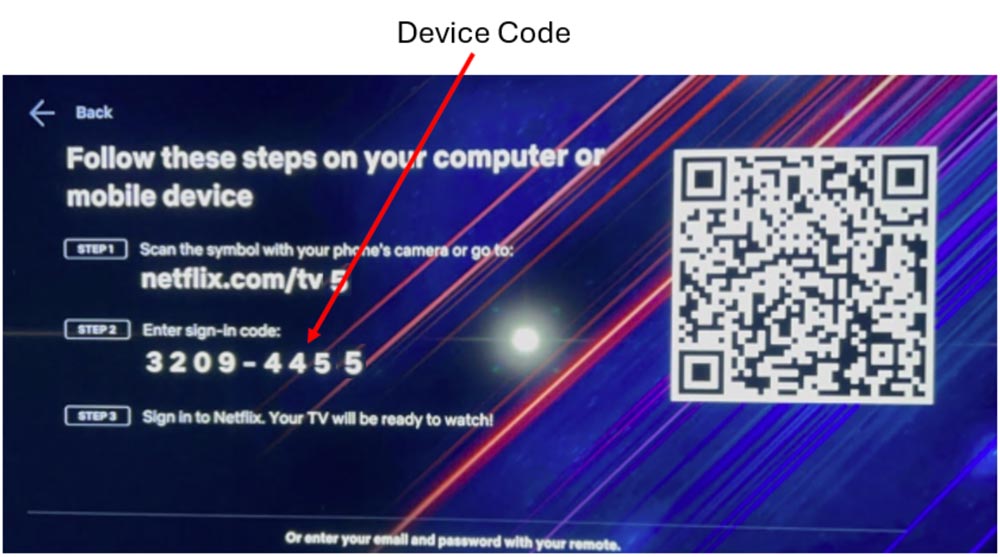
Because it’s cumbersome and time-consuming to enter your email address and password on a device without a keyboard (like a TV), device codes make logging in easier by verifying that the device belongs to the intended user.
The problem is attackers are weaponizing this technology to steal verified tokens that allow them to bypass multifactor authentication.
Before you panic, there are simple ways to combat these attacks. Let’s first break down how these attacks start, and then we’ll discuss ways to protect you and your organization from becoming victims.
How Does a Device Code Phishing Attack Begin?
We should first note that device codes differ from one-time passwords in that they permanently approve a device, whereas one-time passwords are a second factor beyond a password that temporarily approves a user.
Like most phishing attacks, device code attacks begin with an email or a chat. It could be an invitation to a Microsoft Teams meeting or a third-party application asking you to verify credentials. The email contains a device code you must enter to approve access.
The key difference between regular phishing attacks and device code phishing is that the email redirects you to a legitimate login page rather than a fake page designed to steal your credentials.
The key difference between regular phishing attacks and device code phishing is that the email redirects you to a legitimate login page rather than a fake page designed to steal your credentials.
The point of device code phishing attacks isn’t to steal your login credentials; it’s to steal the verified token that tells the service the device already has been approved.
This attack summary from Microsoft breaks down how the attack works.
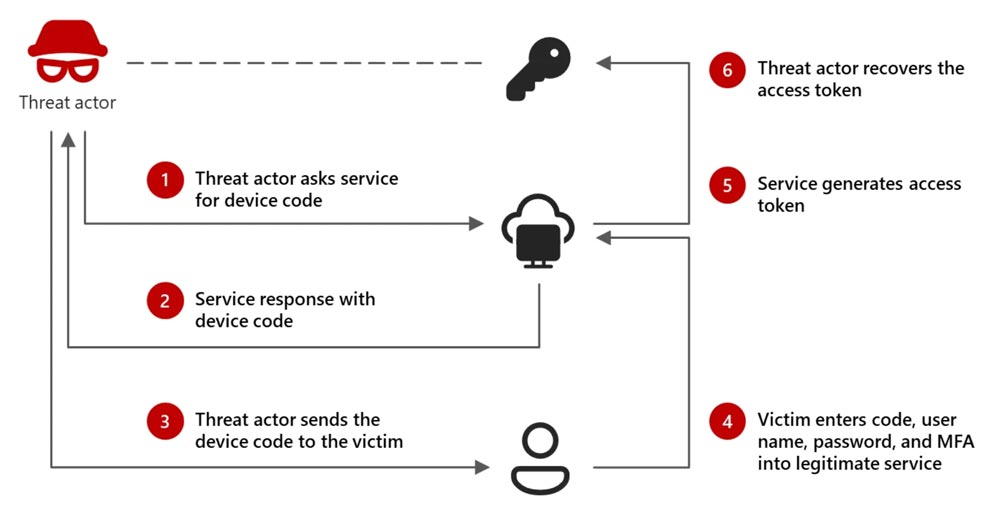
The victim believes their device has been approved, but it was actually the attacker’s device that received approval.
Once access is granted, the attacker has the keys to the house and can operate within the victim’s account, access sensitive information and launch additional attacks.
How Can I Combat These Attacks?
Luckily, there’s an easy way for everyone in your organization to thwart these attacks, and it doesn’t require technical expertise.
Be skeptical of unprompted device codes.
When you log in to Netflix for the first time, you’re expecting a device code. When you receive a Teams meeting invite you didn’t expect, it should raise red flags.
Additionally, legitimate services like Microsoft won’t email device codes to users and then ask them to log in on a separate website.
Simply understanding that you must first initiate a device code will prevent many of these attacks.
But combating these attacks doesn’t just rely on the individual user. Your IT team or managed service provider can implement specific security measures to reduce the risk of device code phishing.
- Disable device code flows if you don’t use them: Removes the entire attack vector
- Enable conditional access policies: Blocks access based on location
Ultimately, a combination of awareness and security policies is key to stopping these attacks.
Stop Device Code Phishing Attacks Before They Wreak Havoc
All it takes is one malicious device code to give attackers unlimited access to your organization.
Contact us to schedule a consultation to discuss how we can help secure your sensitive data by training your employees to spot device code phishing attacks and other scams.
Stay updated! Get tips and insights delivered to your inbox weekly by subscribing to our newsletter.