How to Use Copilot to Stay on Track During Teams Meetings
Are your virtual meetings inefficient?
A laundry list of talking points can make it hard to keep everyone on track — or even remember what was discussed.
Microsoft Copilot aims to solve these problems by summarizing key discussion points, suggesting action items and answering questions, all in real time during a meeting.
Let’s discuss how to use Copilot and how you can get the most out of it during your meetings.
Note: If you need a refresher on summarizing meetings afterward, click here.
Setting Up Copilot
You must have a paid Copilot license to use this feature, and meeting transcription is required to use Copilot.
To turn on transcription, select the three dots (More) at the top of your screen. Hover your cursor over “Record and transcribe” and select “Start transcription.”
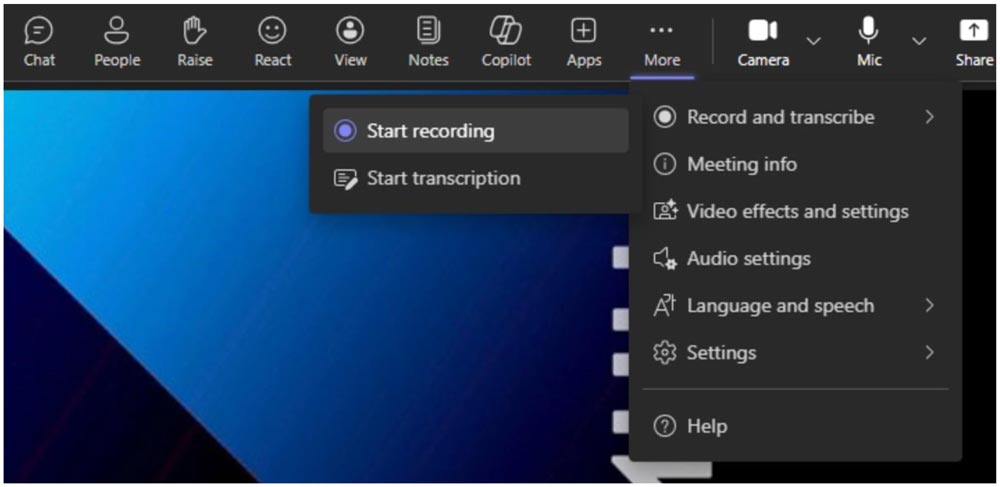
Additionally, you can select the “Copilot” button in the upper right-hand corner, and you’ll receive a prompt to start transcription.
Make Meetings More Effective
With Copilot, you can sift through the noise and get answers to your questions about the meeting.
Once you have opened the Copilot pane, you can select “View prompts” to see suggestions. Of course, you also can compose any question you want.
Stop wasting time manually taking notes during your important meetings. You can get detailed summaries and summarize the most important moments using Copilot.
Here are some suggested prompts to use:
- Where do we disagree on this topic?
- How did (a meeting participant) respond to this proposal?
- What questions can I ask to move the meeting forward?
- Create a table with the ideas discussed and their pros and cons.
- List the ideas, including people’s feedback, from transcript and chat.
Even if you join a meeting late, Copilot will offer to catch you up on what you missed.
Elevate Your Meetings with Copilot
Stop wasting time manually taking notes during your important meetings. You can get detailed summaries and summarize the most important moments using Copilot.
Want to learn more about how Copilot helps keep your team on track after meetings? Contact us to schedule a consultation.
Stay updated! Get tips and insights delivered to your inbox weekly by subscribing to our newsletter.