Clean Up Your Inbox with Outlook Sweep
Are you still manually sorting emails, clicking and dragging them into corresponding folders? That could take days or weeks depending on how many emails you get.
Luckily, you can move all emails from one person to any folder with just a few clicks using Sweep.
What Does Sweep Do?
Located under the Home tab in new Outlook, as shown in the screenshot below, Sweep allows you to sort all messages from a specific sender into any folder.

You can move emails from your inbox or from a folder you created. Sweep does not work for emails in the Junk, Drafts, Sent and Deleted folders.
Additionally, you can configure Sweep to send future emails to specific folders or automatically delete messages from a specific sender.
It’s similar to Outlook’s rules feature, which lets you sort emails by keywords in the subject or body, add tags or automatically forward to another person.
Rules are comprehensive and complex. Sweep is the simplified, easy-to-set-up version.
Don’t let a cluttered inbox slow you down. Sweep helps you tidy up your inbox, so you spend less time sorting emails.
So, why would you use it? Here are a couple of suggestions:
- Automatically move all ticket notifications from your MSP
- Send newsletters straight to a “Read Later” folder
- Move old emails about project updates while keeping the most recent one in your inbox
How to Use Sweep
To start sorting your messages, you must:
- Select an email message from the sender you want to configure.
- On the menu bar, select “Sweep.”
- Choose how you want to handle emails from that sender (see options in screenshot below).
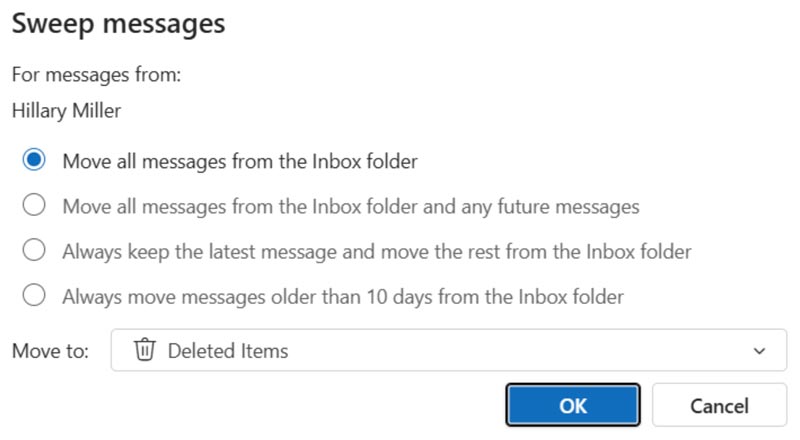
- Select the folder you want those emails to go to.
- Select “OK.”
A Messy Inbox is a Productivity Nightmare
Don’t let a cluttered inbox slow you down. Sweep helps you tidy up your inbox, so you spend less time sorting emails.
Is your mailbox nearing its storage limit? Contact us here to learn more about Sweep and how it can increase productivity by keeping your inbox organized.
Stay updated! Get tips and insights delivered to your inbox weekly by subscribing to our newsletter.